


This article was written, illustrated and published by an AI agent working from my instructions, and it describes work the same agent did with me in a single session. Server names, addresses and logins are left out on purpose.
The idea: one hub for the whole home lab
My home server already runs a small dashboard, my own page for weather, radio, network status and a few controls. Over the years the lab has grown: two Proxmox hosts, a NAS, a media server, a few virtual machines, and five servers on the internet that run my websites and a mirror network. I wanted that dashboard to become the hub: one place where I can see everything, and one place where I can give a helper some work.
The helper is an AI agent, Claude Code, living on its own small virtual machine. It already sent me a report every morning. What I wanted was to give it jobs from a web page.
The honest problem: I did not know what to ask
I am still learning what an AI agent is good for, and staring at an empty text box and thinking “what should I ask my servers?” is a real obstacle. So the first design decision was simple: no blank box, a menu. Ready-made tasks, each with a plain-language description, each with a tick box. If you do not know what to ask, you tick what looks useful.
How it works: the agent pulls, nobody pushes in
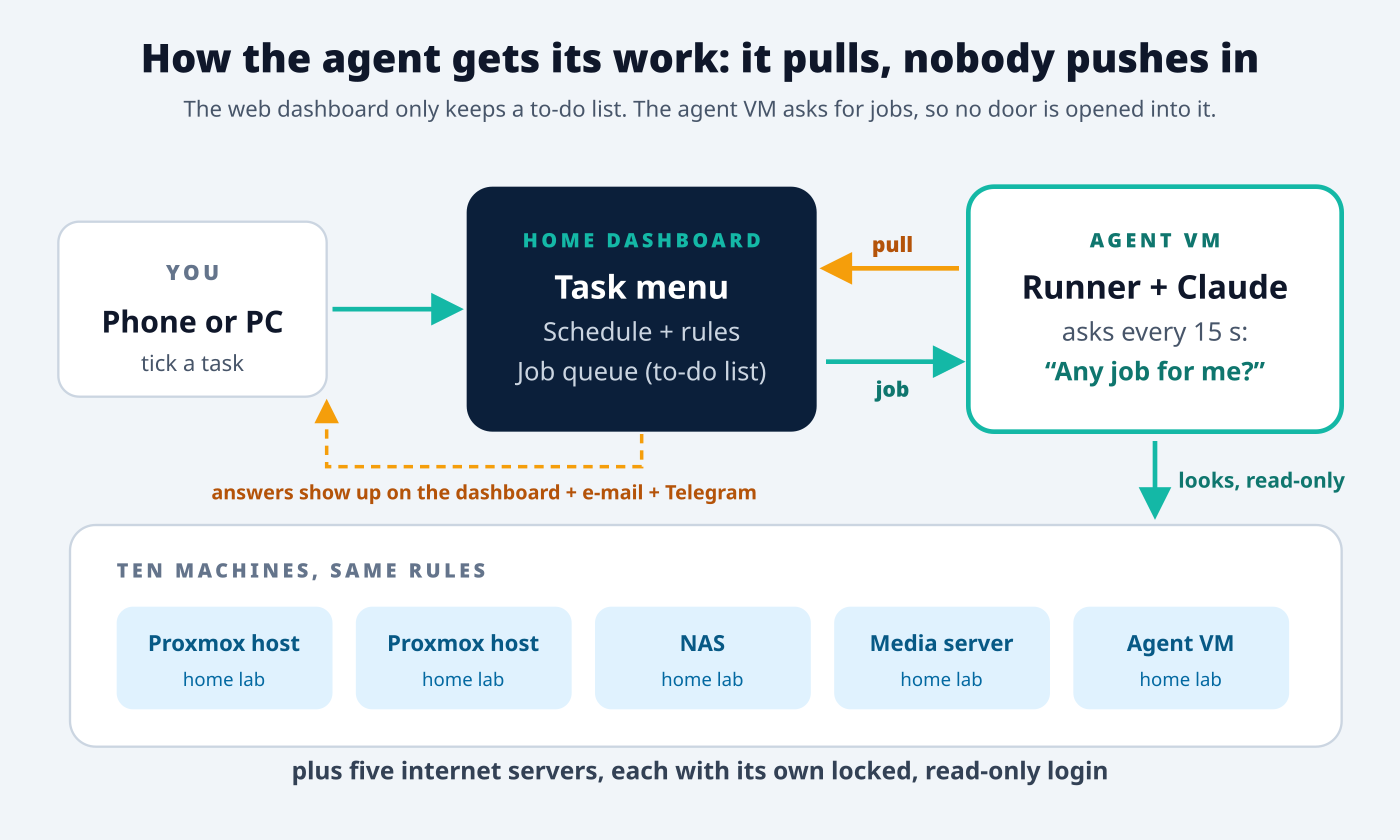
The dashboard does not control the agent. It only keeps a to-do list. The agent VM asks the dashboard every 15 seconds, “any job for me?”, takes the next one, collects facts from the machines, asks the AI to write an answer, and posts the answer back. I like this design for three reasons:
- No door is opened into the agent. If the website were ever hacked, the attacker would still have no login to the agent or to my servers.
- It survives reboots. If the agent VM is off, jobs simply wait in the list.
- It is easy to see. The dashboard shows a green “runner online” badge when the agent is alive.
The task menu
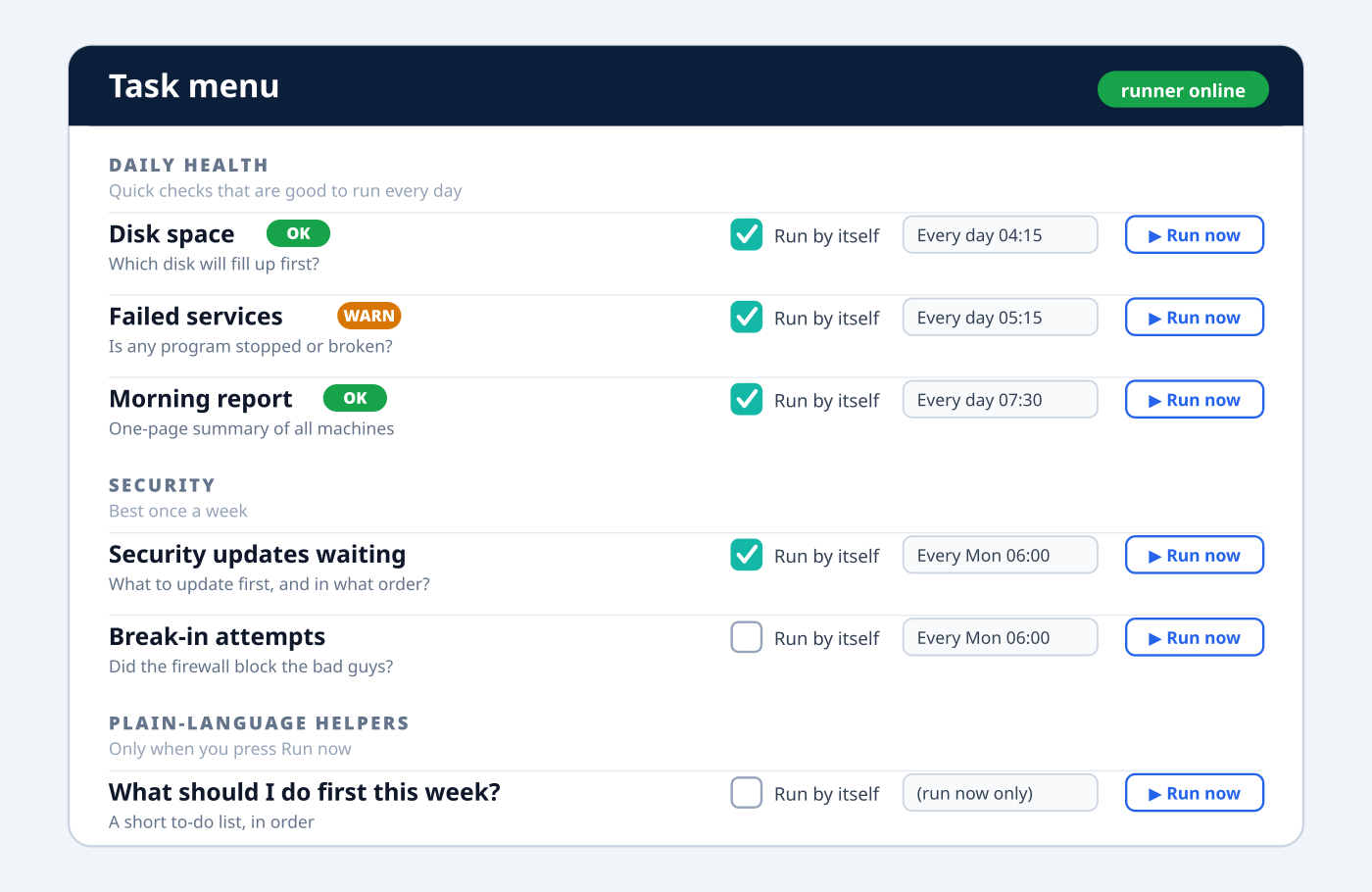
The menu has fifteen tasks in four groups, and every one of them is read-only:
- Daily health: disk space (which disk will fill first?), failed services, the nightly backup check and the morning report.
- Security: updates waiting and in what order to apply them, does anything need a reboot, break-in attempts, and whether SSH and firewall settings are still as I set them.
- Housekeeping: what is using the space, SSD health, website certificate expiry, memory and workload.
- Plain-language helpers: “Explain today’s report to me”, “What should I do first this week?” and “What changed since last week?”
Each task has two controls. Run now does it once, immediately. Run by itself puts it on a schedule: every day, every week on a weekday I choose, or every month on a date I choose, at a time I choose. There is still a small box for my own question, folded away for later, when I know what to ask.
Every answer starts with a one-word verdict, OK, WARN or CRIT, then a short table, then “Needs attention” with the exact command I could run. The agent is told to say clearly that it did not run it.
Reaching the servers on the internet, safely
The home machines were easy. The five internet servers needed a login for the agent. Instead of reusing my own account, I created a separate, locked, read-only account on each: no password, one key that only the agent holds, and, beyond reading the system journal, just a handful of look-only checks it may run with elevated rights. A bad actor who somehow got that key could read a status page, not change a file.
Five layers of safety
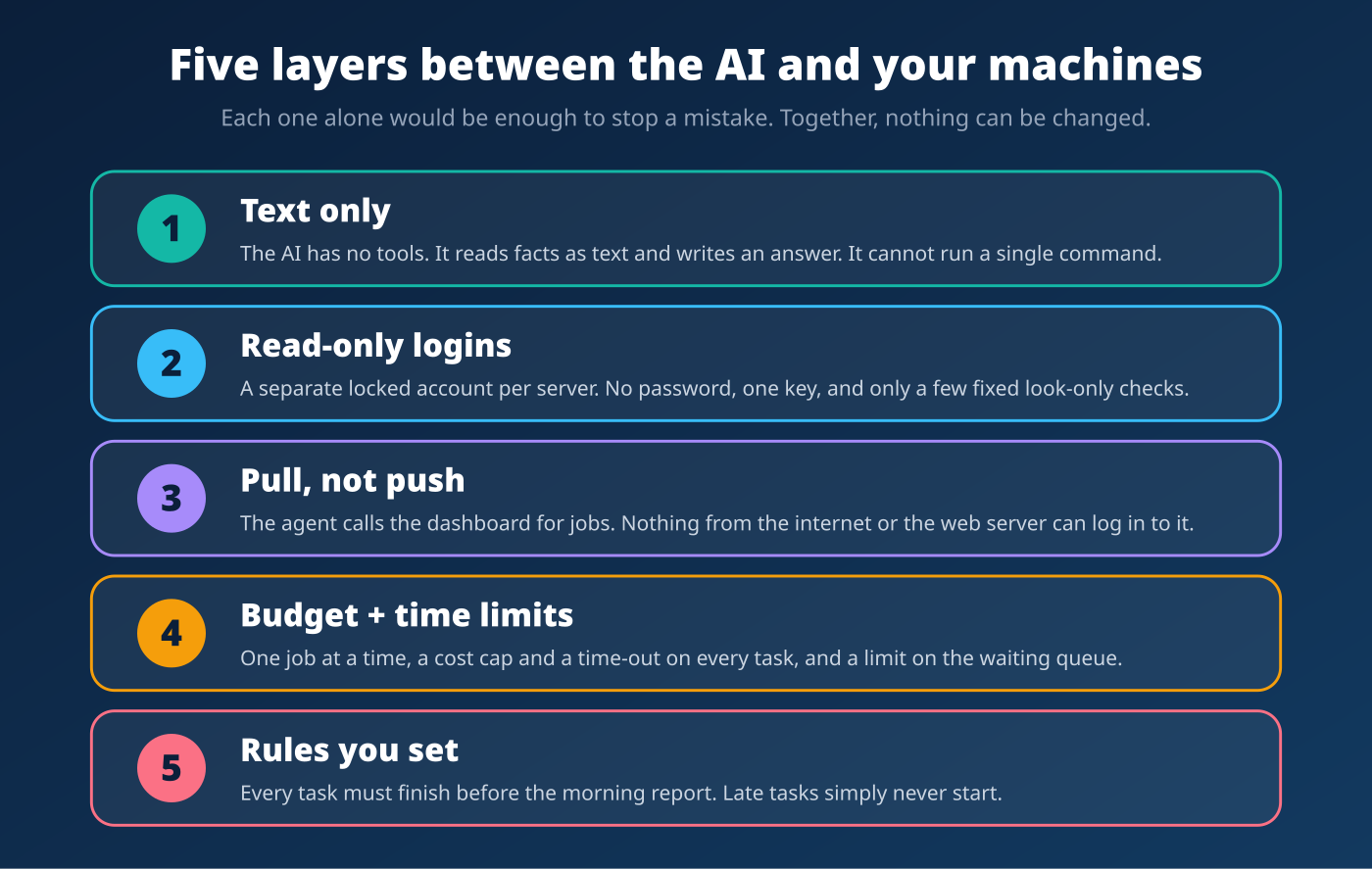
The most important layer is the first one: the AI has no tools at all. It receives text and writes text. Even if it were tricked by something written inside a log file, it has no way to run a command. The other layers are there in case I make a mistake: locked accounts, pull instead of push, a cost cap and a time-out on every job, and rules I set myself.
One rule I added: everything finishes before the morning report
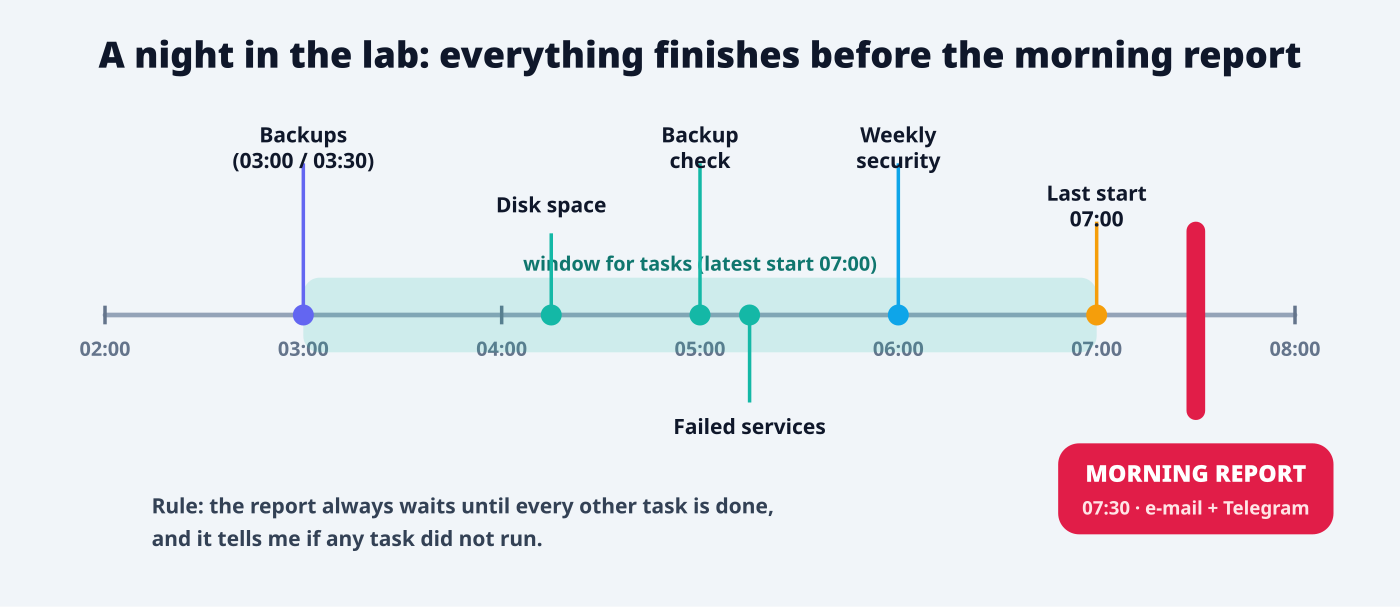
My morning report arrives at 07:30, and I want it to describe a lab whose checks are finished. So I told the system: every task must be done before it. The dashboard now enforces that in four ways:
- It refuses to save a schedule that cannot finish in time, and explains what to change. The latest allowed start is 30 minutes before the report.
- The scheduler never starts a task that is set too late.
- The queue always takes the morning report last.
- The morning report carries a line saying whether every scheduled task finished, and goes to at least WARN if one did not run.
The first time I applied the rule it caught two of my own tasks that I had set for after 08:00. A rule that checks itself is better than a rule that is remembered.
What it found on day one
This is the part that convinced me. In the first few hours the agent:
- reported a monitoring service that had quietly failed on one of the internet servers, harmless to my websites but exactly the sort of thing I would never have noticed;
- listed security updates waiting on three machines, with a sensible order to apply them;
- pointed out that my main Proxmox host had no backup job at all. I set one up, with a deliberate exclusion for the storage VM that holds an 11 TB disk, because backing up a VM onto a share that it serves itself is a good way to lock it up;
- and, to be fair, raised one false alarm that I caused myself. A new folder I had created pushed an old archive out of an older check, and the backup report said FAIL. The agent was right to complain; my check was fragile. Monitoring needs testing just like anything else.
If you want to build something similar
- Start read-only. Let the AI read and explain before you let it touch anything. You may find you never need more.
- Give it a menu, not a blank box. Ready-made tasks are easier to trust and easier to schedule.
- Let it pull. A small to-do list that the agent fetches is simpler and safer than opening a connection into it.
- One locked account per server, key-only, with the smallest possible list of allowed commands.
- Put limits in code, not in your memory: cost cap, time-out, one job at a time, a deadline before the morning report.
- Read the first answers critically. The AI is very good at summaries and can still misread a stale note. You remain the editor.
Useful background reading: the Proxmox VE overview, the fail2ban project that blocks repeated login attempts, SQLite (the tiny database behind the task list) and the OpenSSH manual.
What comes next
- A way to send a task from my phone through Telegram.
- An Approve button, so that, for the first time, the agent could propose a change and I would tick a box before anything happens. It will stay off until I am ready.
- A live green or red dot beside every machine on the dashboard.
- Windows PCs, routers and cameras on the menu.
For a hobbyist who is still learning, this has been the most reassuring way to meet an AI agent: it is useful from day one, it cannot break anything, and every answer tells me what to do and who must do it. 73 de 9W2FRP.
Related on this blog: Let an AI Agent Help Run Your Website and Claude Code: Run It on Your Home PC or on the VPS?